One Gold EA MT4 – Automated XAUUSD Robot for the H1 Chart
One Gold MT4 EA is an automated Expert Advisor for MetaTrader 4 built to trade Gold (XAUUSD) on the H1 timeframe. It analyses historical and current gold price data with a neural-network based model and opens and manages trades by itself once it is attached to the chart and AutoTrading is on.
The EA gives you control over risk through a set of configurable inputs: lot sizing, stop loss, trailing stop, profit targets, trading sessions, spread limits and a news filter. It can start from a recommended balance of about $100 in its conservative mode. The version on Unlock EA is One Gold MT4 EA V6.1, for MT4 build 1420 and newer. It needs no DLL files and comes with an unlimited license and free updates.
On this page you will find the key specifications, how the robot approaches the gold market, each group of settings in plain English, a careful starting setup, the real risks you should know about, and an install guide for MT4. Read the safety section carefully: the EA has more than one risk mode, and the higher modes behave very differently from the conservative one.
One Gold EA – Key Specifications
| Platform |
MetaTrader 4 (MT4), build 1420 or newer |
| Symbol |
XAUUSD (Gold) |
| Timeframe |
H1 |
| Strategy type |
Neural-network based analysis of gold price data |
| Risk modes |
Conservative mode, and a more intensive mode with recovery |
| Recovery |
Built-in recovery mode (Intensive + Recovery) that adds exposure after a loss |
| Protection |
Stop loss, trailing stop, spread limit, news filter |
| Minimum deposit |
$100 (conservative mode); about $500 for the intensive + recovery mode |
| Leverage |
1:30 works for conservative mode |
| DLL |
Not required |
| VPS |
Recommended |
What Is One Gold EA?
One Gold EA is a gold trading robot for MT4. Instead of following one simple indicator rule, it uses a neural-network based model and data-driven algorithms to study gold price behaviour. The idea is that the model looks at past and current market data on XAUUSD and decides when the odds of a move in one direction are good enough to open a trade.
The EA was designed with a short setup in mind. Many of the core strategy values are built into the code, so you do not need to tune dozens of technical inputs before you start. What you do control are the risk-related settings: how large each trade is, how far the stop loss is, whether a trailing stop is used, when the EA is allowed to trade, and whether it should stop before major news.
It is important to understand that One Gold EA has more than one way of trading. In its conservative mode it is meant to work on small balances with modest leverage. There is also a more intensive mode that can be combined with a recovery function, which needs a larger balance. How these modes behave in practice matters more than any headline profit number, so test them separately on demo before choosing one.
One Gold EA Live Results
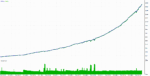
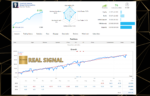
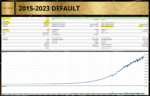
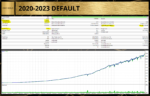
At the time of writing there is no public live signal for One Gold EA that we can link to. Backtest reports for the MT4 version have been published. They are useful to see the general behaviour of the robot, but please read them with caution:
| Backtest report |
Start balance |
Total net profit |
Winning trades |
Max drawdown |
| 2020–2023, XAUUSD, 99% modelling quality |
$10,000 |
$56,970.98 |
89.69% |
14.70% |
| 2015–2023, XAUUSD, 99% modelling quality |
$1,000 |
$3.65 million |
92.19% |
14.92% |
What these reports tell you
The win rate is very high in both tests, around 90%, and the drawdown is close to 15%. That suggests a style where most trades close with a small profit and a smaller number of trades close with a larger loss. A high win rate looks comforting, but it also means one losing trade can remove the profit of several winners.
The profit of the 8-year test (from $1,000 to millions) comes from compounding the lot size over many years in a tester with ideal conditions. A real account pays spread, commission, swap and slippage, and gold can gap or spike on news. Do not expect anything close to that figure in live trading. Use these reports as a picture of how the EA behaves, and judge it on your own demo and small live account.
Will One Gold EA Work for Me?
This EA is a good match if you:
- want an automated robot that trades only Gold on MT4,
- are comfortable with the H1 chart and a slower trading pace than a scalper,
- can start with $100 or more in conservative mode,
- can run MetaTrader 4 on a VPS 24/5,
- have a broker with low gold spreads on a standard (not cent) account,
- will test the different risk modes on demo before going live.
It is not a good match if you want to trade forex pairs or indices, if your broker has high gold spreads, or if you plan to use the intensive or recovery mode on a small account. Cent accounts and high-spread brokers may also affect performance.
How One Gold EA Trades
Step 1 – Read gold price data on H1
The EA works on the H1 chart of XAUUSD. It studies historical and current price data with its neural-network based model to judge the likely direction of the next move.
Step 2 – Check the filters
Before opening a trade, the EA checks the conditions you set: trading session times, maximum spread, and the news filter. If the spread is too wide, the session is closed, or important news is near, no new trade is opened.
Step 3 – Size the trade
The lot size is calculated from your lot settings – a fixed lot or a risk-based lot. The EA can also adapt risk to the account leverage. This is the most important setting to control, because it decides how large every loss will be.
Step 4 – Manage the open trade
Once a trade is open, the stop loss, take profit and optional trailing stop manage the exit. A profit target setting can also close trades when a chosen amount of profit is reached.
Step 5 – Recovery (only if enabled)
If you select the intensive mode with recovery, the EA can take further action after a losing trade to try to recover it. This raises exposure and is the main reason the recommended balance for this mode is higher. In conservative mode, keep recovery switched off.
Key Features of One Gold EA
Built only for gold
The EA is designed for XAUUSD on H1. All logic and risk settings are made with the size and speed of gold moves in mind.
Neural-network based analysis
Entries are based on a model that uses neural networks and data-driven algorithms, rather than a single standard indicator rule.
Simple setup
Core strategy values are built into the code. You mainly set risk, lot size and filters, which reduces the chance of setup mistakes.
Several risk modes
A conservative mode works from about $100. A more intensive mode with recovery is available for larger balances and higher risk tolerance.
Adjustable news filter
The EA can stop trading before important economic announcements, when gold can move hundreds of points in a few seconds.
Full risk controls
Inputs cover lot sizing, stop loss, trailing stop, profit target, spread limit and trading sessions, so you can shape the risk to your account.
Prop firm use at low risk
At low risk settings the EA is designed to stay within the daily loss and drawdown limits that prop firms use. Always check your firm’s rules first.
One Gold EA Settings Explained
The inputs are grouped by purpose. The exact names can differ between versions, and we do not list default values that we cannot confirm. Open the inputs tab and check every value before you start.
1. Risk and lot size
| Setting |
Default |
What it does |
| Lot mode |
Your choice |
Fixed lot, or a lot calculated from balance and risk. |
| Risk level |
Your choice |
Controls how much of the account is at risk per trade. |
| Risk mode |
Your choice |
Conservative, or intensive with recovery. |
Start with conservative mode and a low risk value. A fixed small lot is the easiest way to see how much each trade can lose. Only move to a risk-based lot once you understand the size of normal losses.
2. Recovery
| Setting |
Default |
What it does |
| Recovery settings |
Your choice |
Control whether and how the EA tries to recover losing trades. |
Recovery functions increase exposure after a loss. Keep them off unless you have a larger balance, have tested them on demo, and accept a deeper drawdown.
3. Exits
| Setting |
Default |
What it does |
| Stop loss |
Your choice |
Maximum loss distance for each trade. |
| Take profit / profit target |
Your choice |
Closes trades when the target is reached. |
| Trailing stop |
Your choice |
Moves the stop behind price as the trade goes into profit. |
Make sure a stop loss is active. A trailing stop can protect profit on strong gold moves, but a very tight trail may close good trades too early.
4. Time, spread and news
| Setting |
Default |
What it does |
| Trading sessions |
Your choice |
Hours when new trades are allowed (broker server time). |
| Maximum spread |
Your choice |
Blocks entries when the gold spread is too wide. |
| Execution settings |
Your choice |
Slippage and order handling options. |
| News filter |
Your choice |
Pauses trading around important economic news. |
Keep the news filter on. Gold reacts strongly to US data such as NFP, CPI and interest rate decisions, and spreads widen at those times.
Recommended Starting Setup
- Chart: XAUUSD, H1
- Account: standard or ECN account with low gold spread (not cent)
- Balance: $100 or more for conservative mode
- Leverage: 1:30 or higher
- Risk mode: conservative, recovery OFF
- Lot: smallest fixed lot or a low risk value
- News filter: ON
- VPS: yes, close to your broker’s server
Run the EA on a demo account for a few weeks before going live. Because it trades on H1, it may open fewer trades than a scalper, so be patient and look at a meaningful number of trades. Check that the spread limit fits your broker’s normal gold spread: if the EA never trades, the limit may be too tight; if it trades during very wide spreads, it is too loose. Only consider the intensive or recovery mode after you have a larger balance and have seen how it behaves on demo.
Is One Gold EA Safe?
No trading robot is risk-free. Here are the main risks to understand:
- Recovery mode raises risk. The EA has a recovery function that increases exposure after a losing trade to try to win the loss back. Like any loss-recovery logic, it can create a deep drawdown in a long one-way gold move. Keep it off at the start.
- Gold is volatile. XAUUSD can spike on news and gap at the weekly open, which can hit stops or cause slippage.
- High win rate, bigger losses. Backtests show a win rate near 90%, which usually means the losing trades are larger than the average win.
- No public live signal. There is no live account we can link to, so your own testing is the only real check.
- Backtests are ideal conditions. Tester profits do not include all real costs and should not be expected live.
- Broker differences. High spreads or cent accounts may change the results.
How to reduce the risk: use conservative mode, keep recovery off, keep the news filter on, use a small lot, run it on a VPS, and test on demo first. Set a personal limit, such as stopping to review the EA if the account falls by a fixed percentage.
Strengths and Limitations
| Strengths |
Limitations |
| Built only for gold on H1 |
Gold only – no forex pairs |
| Simple setup with core values in the code |
Exact strategy rules are not published |
| Conservative mode from about $100 |
Recovery mode increases exposure |
| Stop loss, trailing stop and profit target controls |
No public live signal to compare with |
| Adjustable news filter and spread limit |
Sensitive to broker spread on gold |
| Can be used at low risk for prop firms |
Backtest profits are far above realistic live results |
Who Should Use One Gold EA?
- Gold traders who want an automated XAUUSD robot on the H1 chart.
- Small account owners who will use the conservative mode from about $100.
- Prop firm traders who keep the risk low and check their firm’s rules.
- Careful testers who compare the risk modes on demo before going live.
- Portfolio builders who want a gold strategy next to EAs on other symbols.
It is not for traders who want to run recovery mode on a tiny account, who expect the backtest profits in live trading, or who trade with a high-spread broker.
What You Get (Download Package)
- One Gold MT4 EA V6.1 for MetaTrader 4 (.ex4)
- No DLL required
- Unlimited license – use it on as many accounts as you like
- Lifetime access and free future updates
- Instant download after payment
How to Install One Gold EA on MT4
- Download the EA file from your Unlock EA account after checkout.
- In MetaTrader 4, open File → Open Data Folder → MQL4 → Experts and paste the .ex4 file there.
- Restart MT4, or right-click Expert Advisors in the Navigator and choose Refresh.
- Open an XAUUSD H1 chart. Check your broker’s exact gold symbol name, for example XAUUSD, GOLD or XAUUSD.m.
- Drag One Gold EA onto the chart, choose conservative mode, set the lot or risk value and click OK.
- Click the AutoTrading button in the MT4 toolbar so it turns green.
- Run it on a demo account first, then move to live with a small lot.
Looking for more gold robots? Browse all MT4 Expert Advisors on Unlock EA.
Frequently Asked Questions (FAQ)
1. What is One Gold EA?
An automated MetaTrader 4 Expert Advisor for XAUUSD on the H1 chart that uses a neural-network based model to analyse gold price data.
2. Which symbol does it trade?
XAUUSD (Gold) only.
3. Which timeframe should I use?
H1.
4. What is the minimum deposit?
About $100 in conservative mode. The intensive mode with recovery needs about $500 or more.
5. Does it use recovery or martingale-style logic?
Yes, in its Intensive + Recovery mode. That mode increases exposure after a loss to try to recover it, which works like a loss-recovery system and needs about $500 or more. The conservative mode does not need it, so keep recovery off unless you accept higher risk.
6. What leverage do I need?
1:30 works for conservative mode. Higher leverage can be used depending on your risk tolerance.
7. Does it have a news filter?
Yes. It can stop trading before important economic announcements.
8. Is there a live signal?
No public live signal is available to link at the moment. Backtest reports exist, but test the EA on demo yourself.
9. Can I use it on a prop firm account?
At low risk settings it is designed to respect daily loss and drawdown limits. Always check your firm’s rules.
10. Does it work on a cent account?
It can run, but cent accounts and high-spread brokers may affect performance.
11. Does it work on MT5?
No. This version is for MetaTrader 4 only.
12. Does it need a DLL?
No. The version on Unlock EA runs without DLL files.
Conclusion
One Gold EA is a gold-only MT4 robot for the H1 chart that combines a neural-network based model with a full set of risk controls: lot sizing, stop loss, trailing stop, profit targets, spread limit, sessions and a news filter. Its conservative mode can start from about $100, while its intensive mode with recovery needs a larger balance and carries more risk. Published backtests show a high win rate and about 15% drawdown, but there is no public live signal to confirm real results. Start in conservative mode with recovery off, keep the news filter on, use a VPS, and test on demo first.
Risk warning: Trading gold and Forex carries a high level of risk. Past performance and backtest results do not guarantee future results. Only trade with money you can afford to lose.






Reviews
Clear filtersThere are no reviews yet.